



Anker PowerConf C200 Webcam 2K
The Anker PowerConf C200 is designed for users who want sharper video quality, better meeting control, and stronger privacy than a basic laptop webcam.
Its strongest selling point is not only 2K resolution. The real advantage is the combination of ultra-clear video, adjustable field of view, customizable microphone pickup, built-in privacy cover, and AnkerWork software control. This makes it a strong option for office meetings, remote work, online classes, interviews, and content calls.
2K Resolution
The PowerConf C200 delivers sharper video than standard 1080p webcams, helping improve clarity during meetings and video calls.
Real Buyer Benefit
Sharper video makes the user look more professional, especially in business calls, online meetings, interviews, and remote work setups.
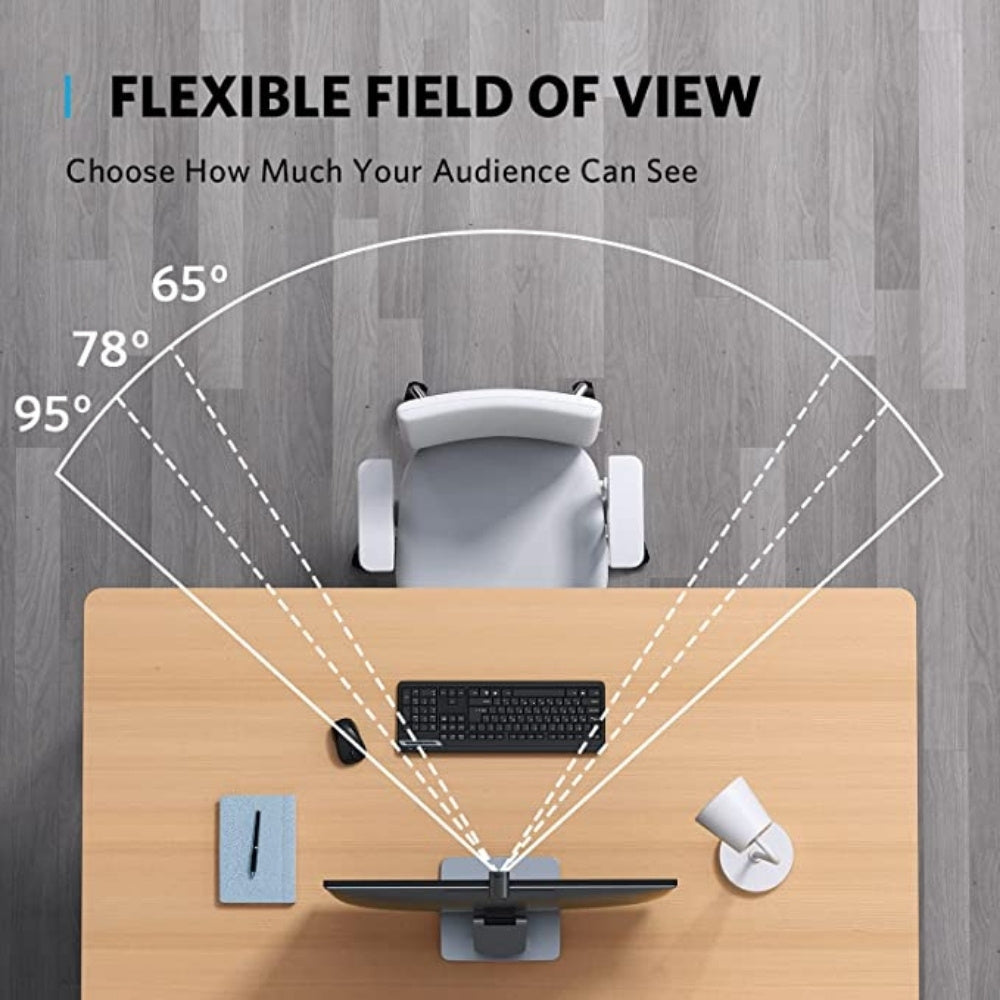
65° Field of View
Best when users want to show mostly their face and reduce background visibility.
78° Field of View
A balanced option for standard meetings and desk setups.
95° Field of View
Useful when users want to show more of the room, include another person, or present a wider workspace.
Directional Pickup
Focuses more on the user’s voice and helps reduce unwanted background sound.
Omnidirectional Pickup
Captures sound more broadly, useful when multiple people are speaking in the same room.
Built-In Privacy Cover
The sliding privacy cover physically blocks the lens when the webcam is not in use.
Why It Matters
This gives users better control and confidence, especially for work-from-home setups where the camera is always connected.
AnkerWork Software
The AnkerWork software allows users to manually adjust field of view and other webcam settings.
Real Advantage
Software control gives more flexibility than fixed webcams, especially when users change between personal calls, team meetings, and presentation setups.
Product Type
Webcam
Model
Anker PowerConf C200
Video Resolution
2K
Field of View Options
65°, 78°, 95°
Microphone Modes
Directional and omnidirectional pickup
Privacy Feature
Built-in sliding privacy cover
Software
AnkerWork software
Best Use
Meetings, remote work, online classes, interviews, and video calls


